Customer Service Reviews: How to Collect and Answer Them

A guest hands back a rental bike. The saddle was too high, the helmet smelled, and nobody asks how the ride went. Later, the owner reads a review about poor service, even though the bike worked and the coastal route was beautiful.
That's the practical value of customer service reviews. They reveal the moments guests remember. A useful review routine starts by fixing those moments, not by chasing a better average.
Why Reviews Follow the Service Moment
Guests don't inspect a business from end to end. They describe what happened to them. A rushed handover can shape a review of an otherwise enjoyable ride. A surprise cleaning charge can overshadow a comfortable holiday home.
The owner's job is to connect the complaint to a task someone can change. Poor communication is too broad. Missing return instructions is something the rental crew can fix before the next booking.
Service moments, what guests judge and the fix
| Moment | What guests judge | Common failure | Fix to make today |
|---|---|---|---|
| Booking | Clear price and what is included | Hidden fees or unclear time slot | Write the price and inclusions on every booking message |
| Arrival | Easy to find and greeted well | Long wait or unclear instructions | Send a short arrival note with a map link before the visit |
| Handover | Equipment ready and fitted | Wrong size, missing lock or unclear safety rule | Check fit and say one safety rule out loud at handover |
| During the service | Pace, comfort and plan for weather | Crowded slots or a rushed guide | Give the crew a one-minute check-in question to ask |
| Return or checkout | Easy drop-off and fair charges | Damage claims or surprise fees | Check condition together and explain any charge on the spot |
| After the visit | Quick answer to questions | Silence and no contact route | Set a routine to reply to every message within one working day |
These are operating choices, not promises about ratings. A weather cancellation may still disappoint a guest. Clear notice, a fair explanation and a workable next step give staff something useful to deliver.
Reviews also matter when prospective customers decide whether to book. Northwestern University's Medill Spiegel Research Center found that a product with five reviews had a purchase likelihood 270% higher than an otherwise comparable product with no reviews; the earliest reviews brought the largest marginal benefit.
The study concerned products, not a guaranteed lift for rental counters or tours. Its findings on higher-priced purchases nevertheless make a visible base of genuine feedback relevant to accommodation and other considered bookings.
Practical rule: Fix the service moment that keeps producing complaints before spending more effort requesting feedback.
A cleaner helmet rack and a proper fit check are more useful than a larger review sign beside the same unresolved problem.
Set Up Your Review Page Today
A direct Google review link is a simple choice for a business using only Google. A combined page suits an operator who also needs Tripadvisor, contact details and guest information. The trade-off is an extra page before the review form, so the review buttons must be easy to find.
HolaQR is a free QR review page with direct review buttons, automatic display in each guest's phone language and a code that never expires. The page, QR code and printable files are free. It reduces the work of keeping several destinations together, but it doesn't replace checking the links.
Build and check the page
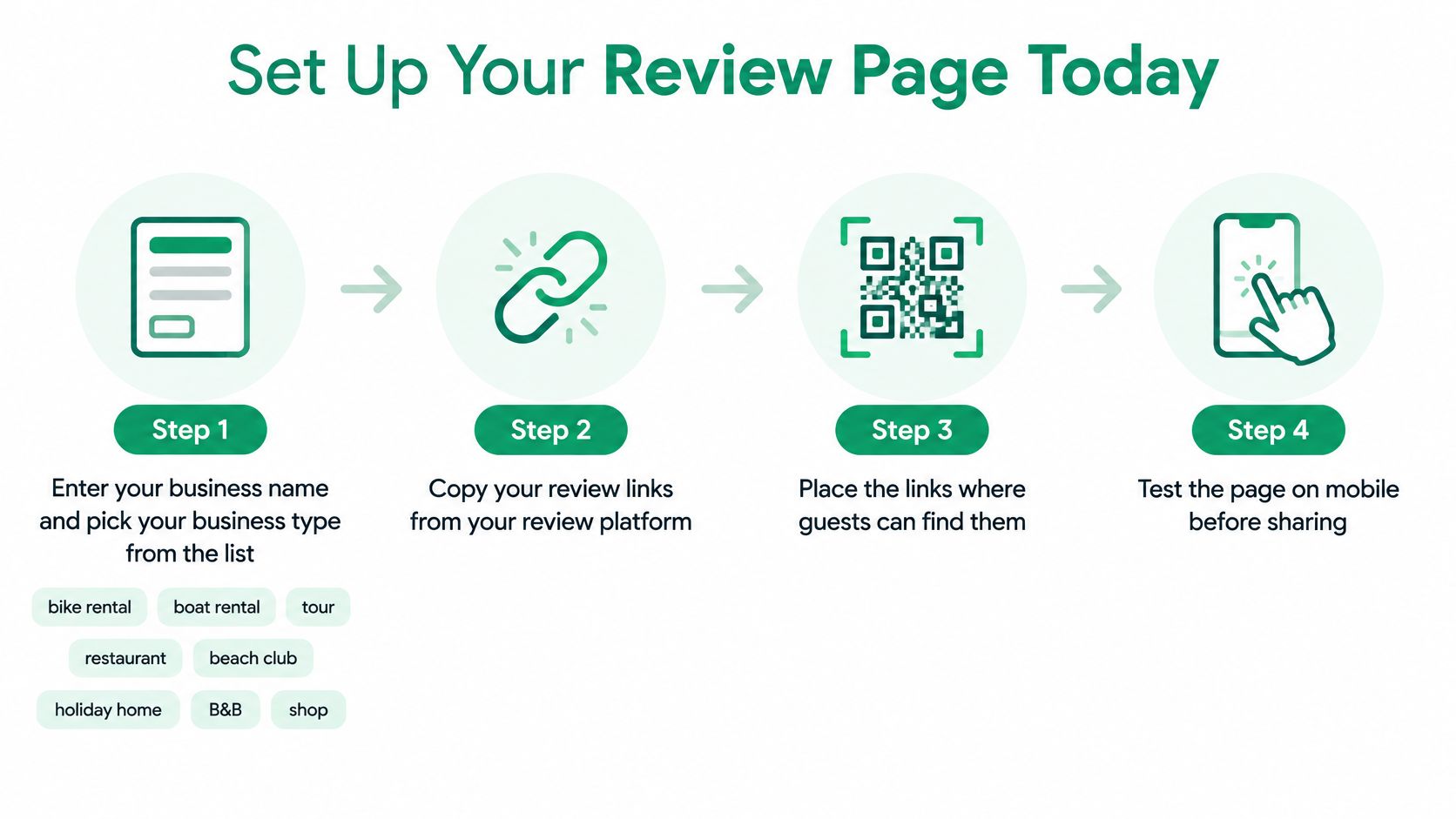
Enter the business details. Type the business name or paste an existing Linktree link so the service can find the logo, social accounts and review links automatically.
Pick the business type from the list: bike rental, boat rental, tours and activities, restaurant, café or bar, beach club, holiday home, B&B or hotel, salon or spa, shop, or something else. Check the result rather than assuming every automatically found detail is correct.
Confirm the review destinations. Copy the review links from the correct Google and Tripadvisor listings and paste or correct them as needed; if the business isn't found, entering the links manually takes about one minute.
Add useful pages for routes, menus, house rules and local tips. Keep labels short so a guest looking for return instructions doesn't have to guess which button opens them.
Download the printable materials. Choose a counter card, table card or a card for the welcome folder, with a readable business name and a clear invitation to leave honest feedback.
Print and place the cards where guests already pause, such as the counter, table or equipment return area. Use the same card for every guest, including anyone who has raised a complaint.
Keep the printed card useful
The business name and logo help guests recognize the destination. The guide to branding QR codes offers context for making the printed card recognizable without letting decoration crowd the code.
Links can be updated without replacing the printed code. That's useful when a menu moves or a rental route changes, but an outdated destination still needs an owner to notice and correct it.
- Finish with a test scan. Open the card on a phone, test every review button, then repeat on a phone set to another language to check the automatically displayed page.
Asking Every Guest the Same Way
Asking for reviews is allowed. Selecting only satisfied guests isn't. The simplest test is whether the guest who complained receives the same invitation as the guest who praised the guide.
Google Maps' contribution policy prohibits selectively soliciting positive reviews, discouraging negative reviews and offering incentives for posting, changing or removing reviews. A discount on the next rental isn't an acceptable thank-you for a review.
Tripadvisor's review rules also prohibit incentives, including free drinks, upgrades, raffles and staff rewards tied to reviews. They prohibit review gating, where satisfied guests reach the public review page while dissatisfied guests are diverted elsewhere.
Best moment to ask by business type
| Business type | Best moment to ask | Why it works |
|---|---|---|
| Bike or boat rental | At equipment return | Guest has just finished and the phone is usually out |
| Tour or activity | At the meeting point after the tour | Memory is fresh and the guide can hand over the card |
| Restaurant or café | At payment | Guest has time and the phone is already in hand |
| Beach club or bar | At the bill | Guest is settled and not in a rush |
| Holiday home | In the welcome folder and checkout note | Guest has time to write when leaving |
| Hotel or B&B | At checkout by the front desk | Front desk hands the card to every guest |
These are practical starting points, not measured rankings. Staff should leave guests room to decline, especially when a taxi is waiting or children need attention.
A neutral invitation can be this simple:
Please share an honest account of the visit on Tripadvisor or Google.
Tripadvisor's guide for business owners explicitly encourages asking all customers without strings attached. Requests for a particular star rating and rewards for completing the task don't belong in the script.
HolaQR sends every guest to the same review window, never offers rewards and doesn't choose which guests are asked. Its advice about showing the code when guests are happy and their phones are out should guide convenient timing, never eligibility.
A QR code contact card can also keep business details accessible after departure. Staff shouldn't hover over a guest's screen or check the rating before saying goodbye.
Choose a fixed point in each shift and put the card there. Consistency matters more than a persuasive sales pitch.
How to Reply to Good, Mixed and Bad Reviews
Sort the review before drafting the reply. Praise, a minor process error, an unwelcoming interaction and a serious safety issue need different responses. Treating them all as feedback to acknowledge produces bland replies and weak follow-through.
A process failure needs a cause and a fix. An interactional failure needs recognition that the guest felt dismissed. A serious failure needs prompt attention to the actual risk, not just a polished public answer.
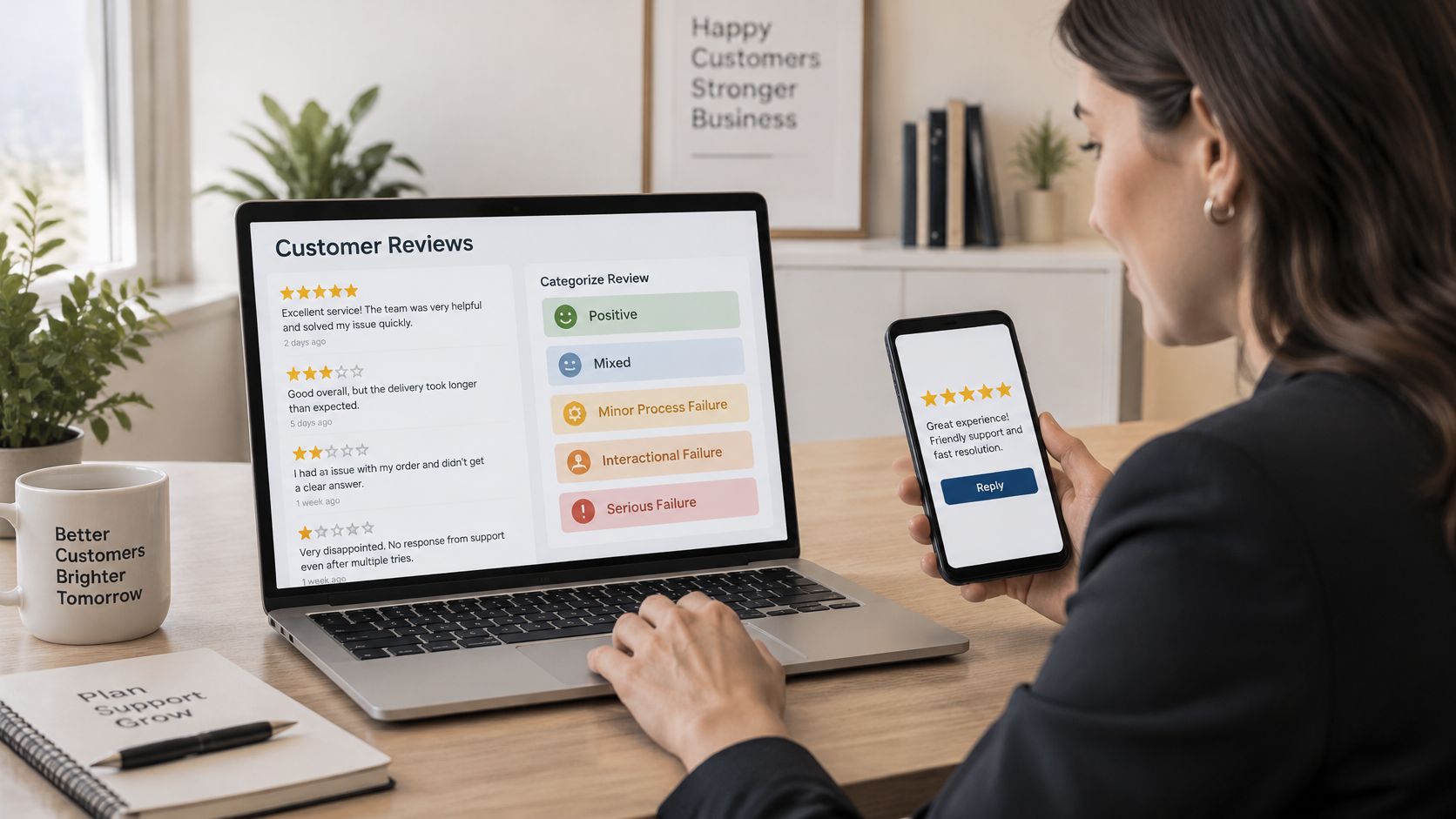
Reply approach by review type
The openings below are illustrative. Statements about repairs, staffing or checks belong in a reply only when those actions have happened.
| Review type | What to do | Example opening line |
|---|---|---|
| Positive | Thank the guest with a specific detail | Thanks, Maria. Lovely to hear the coast trail suited the family. |
| Mixed | Thank for the good part, name the gap and state the change | Thanks for the kind words about the guide. Apologies for the dock wait; an additional check-in now runs on busy mornings. |
| Minor process failure | Explain the cause and the fix | The overnight bike check missed the chain issue. Each chain now gets another check at handover. |
| Interactional failure | Apologise for the treatment and invite direct contact | Apologies for the rushed welcome. Please contact the manager so the team can understand what happened. |
| Serious failure | Respond quickly, explain the action taken and offer a proportionate remedy | Apologies for the boat issue. That boat has been taken out of service; please contact the manager to arrange a suitable remedy. |
A study using Yelp and Tripadvisor reviews associated more varied business responses with longer, more information-rich later reviews. Responses that matched the customer's details were also associated with a more positive tone in later feedback.
That supports specific replies, not copying the guest's complaint into a template. Mention the relevant wait, fitting problem or missing instruction. Avoid publishing booking references, phone numbers or private conversations.
Match the remedy to the failure
Compensation should be proportionate and feasible. Refunding an undelivered service is a recovery decision, not a payment for deleting criticism. Serious equipment problems require action even when the guest never posts publicly.
Monthly tracking can stay simple:
- Negative reviews answered: Count replies and check which complaints remain unanswered.
- Repeated problems: Count new mentions of the same fault after the fix.
- Tone changes: Mark new feedback as positive, mixed or negative and read the reasons.
The working routine is straightforward: read, classify, draft a specific response and verify every promised action before posting.
Showing Reviews Are Real Without Hiding Criticism
A growing review count doesn't automatically create stronger proof. Readers may question uniform praise, vague wording or replies that sound interchangeable. An owner can explain the collection process, but can't prove every reviewer's honesty.
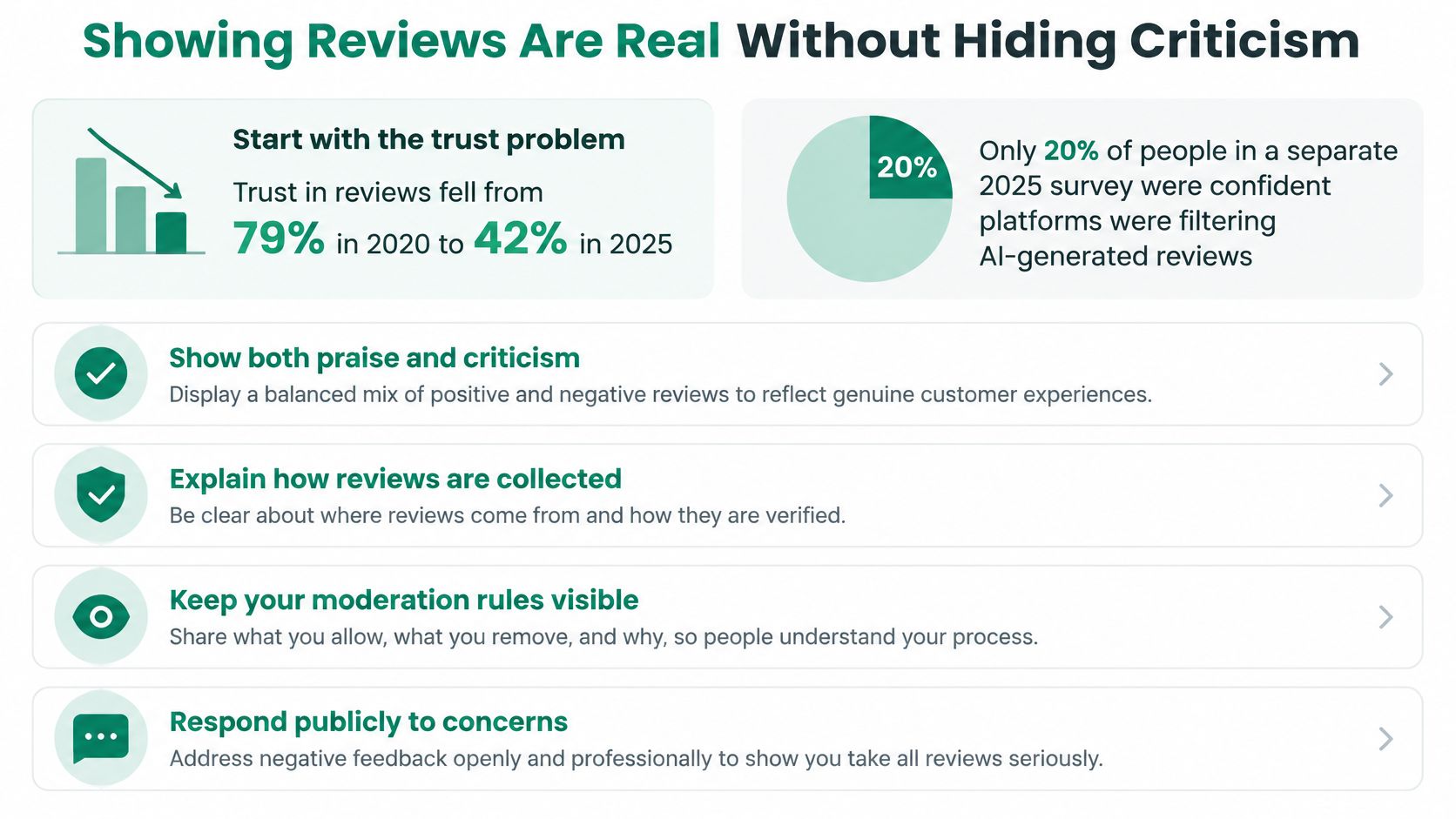
The review statistics roundup published by SocialPilot reports that 42% of consumers trusted reviews as much as personal recommendations in 2025, down from 79% in 2020; it also cites a separate 2025 survey in which 20% of respondents were confident platforms effectively filtered AI-generated reviews and fraud.
Facilitation isn't manipulation
Facilitation means making an independent review form easy to reach. Manipulation means selecting reviewers, steering ratings, paying for praise or suppressing legitimate criticism.
HolaQR doesn't filter guests or change ratings. Each guest chooses the wording and rating, and signs in to Google, Tripadvisor or Facebook as with any review. Access to a review form isn't a guarantee that a review will be published.
Useful detail gives readers something concrete to assess. A guest's account of a windy boat handover, a shaded lunch table or a guide explaining the route says more about the experience than generic praise.
Owners should respond with relevant, non-sensitive context already made public by the guest. They shouldn't supply ready-written praise or pressure guests to name employees. If a review appears to break platform rules, use that platform's reporting process and keep any public reply factual.
Criticism that remains visible alongside a credible response lets prospective guests assess both the problem and the business's handling of it.
Run a monthly authenticity check
- Equal access: Confirm that every guest received the same request.
- No inducements: Check that no reward or favour was offered.
- Relevant replies: Read posted responses and confirm each fits its review.
- Visible criticism: Confirm legitimate negative feedback wasn't removed or hidden on business-controlled displays.
- Documented changes: Record each service change and when it began.
The aim isn't a flawless-looking page. It's a collection process the owner can explain plainly and defend consistently.
Routing Unhappy Guests to Real Help
An unhappy guest may leave without posting anything. The owner sees no complaint and assumes the visit went well, while the guest decides not to return.
PwC research cited in the State of Customer Experience resource found that 52% of surveyed U.S. consumers stopped using or buying from a brand because of a bad product or service experience. Watching public reviews alone leaves private service failures unexamined.
Offer equal routes to help and feedback
A review page should give guests clear choices without asking them to declare whether they're satisfied first:
- Direct help: Provide WhatsApp, phone or email for booking questions, urgent problems and recovery.
- Public feedback: Keep the independent review option available to everyone, including guests seeking help.
Assistance must never depend on a positive rating. Staff shouldn't ask a dissatisfied guest to use private contact instead of publishing criticism. Both options can remain available throughout the resolution.
Each page has a WhatsApp button that sends questions and bookings directly to the business, with no commission to a booking platform. Owners can also add links to routes, menus, house rules and local tips.
Make the answer usable before departure
The page is available in 30 languages and displays in the language of the guest's phone. That helps an international visitor find the relevant option, but staff still need a workable way to understand and answer incoming messages.
A holiday-home owner could place departure instructions beside contact and review buttons. A boat operator could add the return location and a clear instruction to call for urgent assistance, rather than rely on an unattended message.
Track private messages received, repeated questions and cases resolved. Assign someone to unanswered conversations. If guests keep asking where to return keys, improve the instructions instead of repeatedly typing the same explanation.
Start Your Review Routine This Week
Day one: Fix the service moment causing the most repeated complaints.
Day two: Set up the page for a single location and verify the business details.
Day three: Print the cards and brief staff on the neutral invitation. The guide to an ad with a QR code can help with a clear printed layout.
Day four: Answer recent reviews, sorting each by the failure or praise it describes.
Day five: Scan the card and test the page on a phone using another language.
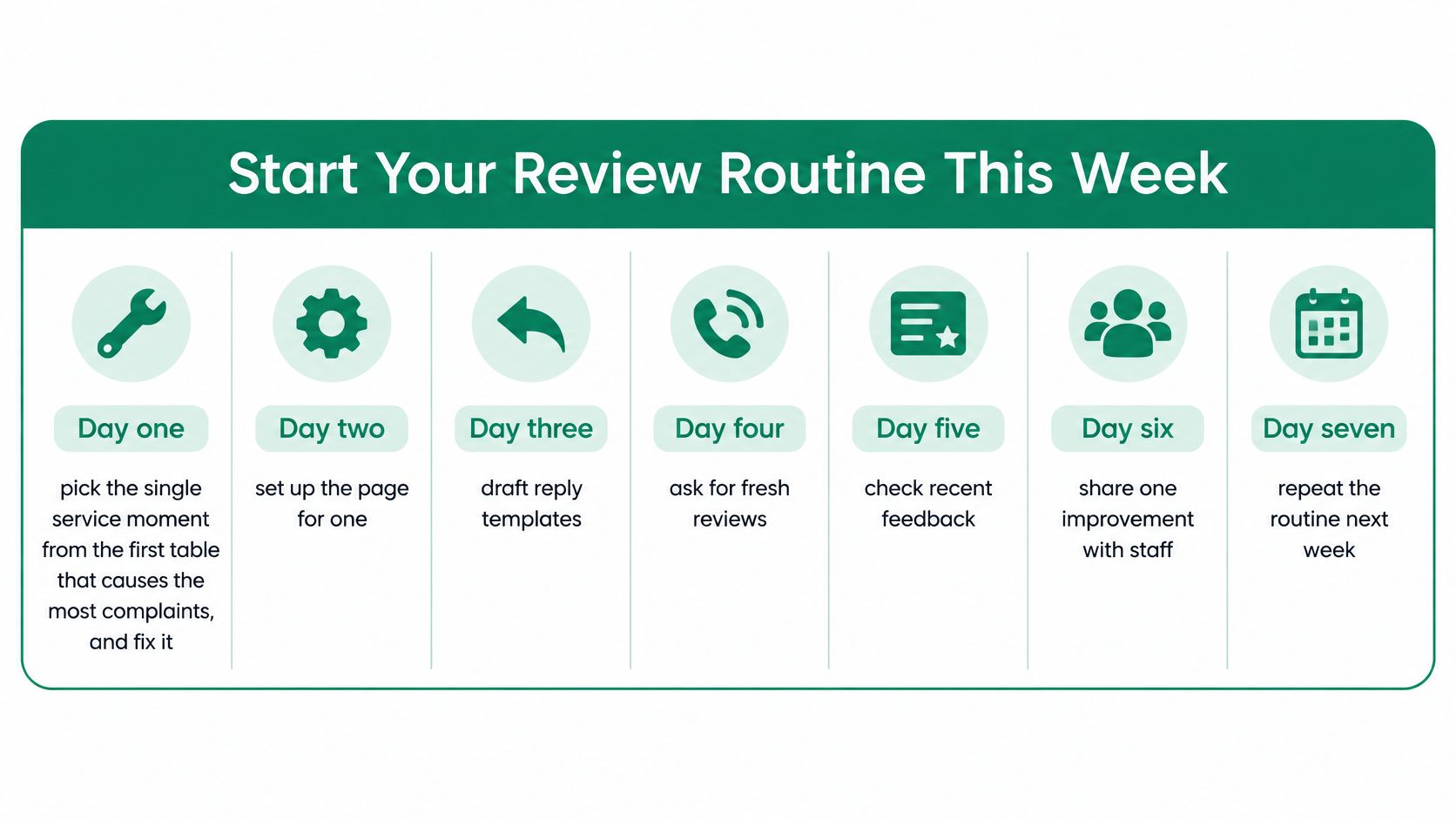
Use the remaining shifts to check placement and staff consistency. After a month, record replies, repeated complaints and changes in tone on a single page. No rating outcome is guaranteed.
Start a free HolaQR page for a single location, test its review and contact buttons, and place the printed card at the chosen service moment. Pair that card with a concrete service fix, then let guests describe the visit openly.